How the DB Repository Pattern Works — Explained
Note: code shown below is just for reference. The main focus is on understanding the concept — the code itself can be structured better depending on your project's requirements.
What Is the DB Repository Pattern?
- Your service file must not consider the logic of 3rd-party DB-interacting libs like
objection.js,pg, etc. - 3rd-party DB-interacting lib logic must live in a separate file called a repository file.
- Your service file must call functions from the repository file, staying unaware of what actual 3rd-party lib is used in the lower layers.
Why Use the DB Repository Pattern?
- If you want to switch your DB-interaction logic from, say,
objection.jstodrizzle-orm, you can do it without changing your service file. - Separation of concerns: the service file doesn't need to have DB calls.
- Unit tests written for the service file won't break or need to change when switching DB-interaction logic.
How to Write the DB Repository Pattern
Usually we write the repository pattern like below:
users-service.js
...
this.userRepository = new UserRepository();
...
await this.userRepository.getUserById(id);
...
users.repo.js
import UserModel from 'objectionjs/UserModel.js';
...
class UserRepository {
    async getUserById(id) {
        return await UserModel.query().findById(id);
    }
}
...
This is partially correct because the actual Objection.js logic is separated out into users.repo.js. But if you look carefully, the object returned from getUserById is of type objectionjs.Model.
That means your service file has to deal with accepting an object of a type defined by a 3rd-party library. The Model type of Objection.js is different from the Model type of some other library — it could have several other object properties and methods attached to it which wouldn't be present in other libraries, or other libraries' Model types would have their own properties and methods.
So here comes the concept of the domain model. A domain model is simply the object type that is local and specific and belongs to your code — it does not belong to any 3rd-party library. The repository file must return this domain model object instead of any particular 3rd-party lib object like objectionjs.Model.
Updating users-repo.js to return a domain model object type instead of a 3rd-party lib object type:
import UserModel from 'objectionjs/UserModel.js';
import UserDomainModel from './user-domain-model.js';
...
class UserRepository {
    async getUserById(id) {
        const user = await UserModel.query().findById(id);
        return this.toUserDomainModel(user);
    }

    toUserDomainModel(user) {
        return new UserDomainModel(user);
    }
}
...
user-domain-model.js
class UserDomainModel {
    id = null;
    name = null;
    email = null;

    constructor(user) {
        this.id = user.id;
        this.name = user.name;
        this.email = user.email;
    }
}
Now, in users-service.js, we get an object of type UserDomainModel — irrespective of any 3rd-party lib used in the lower layers, our service file will always deal with the domain model object, never any specific 3rd-party lib object.
Can One Repository File Fetch From Multiple Tables?
The answer is yes — in real-world applications, you'll always need to fetch from multiple tables via joins etc. So the best approach is to create repository files based on the main business entity.
For example, if you need posts of users along with user details, that involves fetching from at least two tables: users and posts. Since the main entity here is posts, it doesn't make sense to add this to users-repo.js. It should live in a separate posts-repo.js file.
For things which aren't a main standalone entity but can be called a semi-standalone entity dependent on the main entity, you can either add them to the main entity's repository file (if the number of operations is few or very simple) or create a separate repository file for them (if the number of operations is many or complex). Example: country preferences of a user.
How to Handle Transactions in the Repository File
Many times we want to perform more than one operation with atomicity. These operations can belong to different repositories.
If we did the below, we'd be exposing 3rd-party lib transaction logic in the service file, which is against the repository pattern:
users-service.js
...
this.userRepository = new UserRepository();
this.postRepository = new PostRepository();
...
const trx = await knexMaster.transaction();
await this.userRepository.updateUserById(id, data, trx);
await this.postRepository.updatePostByUserId(id, data, trx);
await trx.commit();
...
users-repo.js
...
class UserRepository {
    async updateUserById(trx, id, data) {
        const user = await UserModel.query(trx).findById(id).update(data);
        return this.toUserDomainModel(user);
    }
}
...
posts-repo.js
...
class PostRepository {
    async updatePostByUserId(trx, id, data) {
        const post = await PostModel.query(trx).findById(id).update(data);
        return this.toPostDomainModel(post);
    }
}
...
Instead, we have to abstract even the transaction logic away from the service file and move it into the repository layer. We should rename trx to dbClient to be generic across all libraries — in some libraries conn is used as the variable name for the same thing, in some client, in some trx — they all mean one same thing: a DB client, i.e. a connection.
Now, to abstract the transaction logic, we create a UnitOfWork class.
users-repo.js
...
class UserRepository {
    async updateUserById(dbClient, id, data) {
        const user = await UserModel.query(dbClient).findById(id).update(data);
        return this.toUserDomainModel(user);
    }
}
...
posts-repo.js
...
class PostRepository {
    async updatePostByUserId(dbClient, id, data) {
        const post = await PostModel.query(dbClient).findById(id).update(data);
        return this.toPostDomainModel(post);
    }
}
...
unit-of-work.js
import knex from 'objectionjs/knex.js';

class UnitOfWork {
    dbClient = null;

    constructor() {}

    async begin() {
        this.dbClient = await knex.transaction();
    }

    async finish() {
        if (!this.dbClient.isCompleted()) {
            await this.dbClient.commit();
        }
    }

    async cancel() {
        await this.dbClient.rollback();
    }

    async execute(func, ...args) {
        await func(this.dbClient, ...args);
        // Note: non-read operation functions in repositories must have dbClient
        // as their first parameter for this reason
    }
}
users-service.js
...
this.userRepository = new UserRepository();
this.postRepository = new PostRepository();
...
const unitOfWork = new UnitOfWork(); // for each transaction, re-initiate UnitOfWork
await unitOfWork.begin();
await unitOfWork.execute(this.userRepository.updateUserById, id, data);
...
await unitOfWork.execute(this.postRepository.updatePostByUserId, id, data);
...
await unitOfWork.finish();
...
await unitOfWork.cancel();
...
For programming languages that don't allow functions to be passed as arguments, repositories can instead be initialized inside the UnitOfWork class:
unit-of-work.js
import knex from 'objectionjs/knex.js';

class UnitOfWork {
    dbClient = null;
    userRepository = null;

    constructor() {}

    async begin() {
        this.dbClient = await knex.transaction();
        this.userRepository = new UserRepository(this.dbClient);
    }

    async finish() {
        if (!this.dbClient.isCompleted()) {
            await this.dbClient.commit();
        }
    }

    async cancel() {
        await this.dbClient.rollback();
    }
}
And the repository will use this dbClient, initiated for the object, if a dbClient isn't explicitly passed to the operation function:
...
class UserRepository {
    defaultDbClient = ...;
    dbClient;

    constructor(dbClientParam) {
        this.dbClient = dbClientParam ?? this.defaultDbClient;
    }

    async updateUserById(id, data) {
        const user = await UserModel.query(this.dbClient).findById(id).update(data);
        return this.toUserDomainModel(user);
    }
}
...
The service will then access repositories through the UnitOfWork for transactional operations:
...
const unitOfWork = new UnitOfWork();
await unitOfWork.begin();
await unitOfWork.userRepository.update(...);
await unitOfWork.postRepository.update(...);
...
await unitOfWork.finish();
Should You Create a New Repository Operation for Each Usecase?
Suppose you have the below usecases:
- Get user by id and fetch name, email, phone.
- Get user by id if not deleted or blocked, and fetch name, email, phone & count of posts.
- Get user by phone number and fetch their name, profile picture & get all posts of the user, and for each post, fetch title & description.
- Same as 3, but also fetch each post's
created_atand number of likes. - Get user by email and fetch name, phone, email & one column from a table having a 1-1 mapping with the users table.
- Get user, then join with tables having nested further joins, like
users.country_preferences.countries.currency_symbols.
Ideally you should not create a new operation for each usecase, as it can lead to lots of functions over time. Not like below:
...
getUserById(id) {
    const user = await UserModel.query().select('name', 'email', 'phone').findById(id);
    return this.toUserDomainModel(user);
}

getUserByIdIfNotDeletedOrBlocked(id) {
    const user = await UserModel.query()
        .select('name', 'email', 'phone')
        .whereNot('is_deleted', true)
        .whereNot('is_blocked', true)
        .findById(id);
    return this.toUserDomainModel(user);
}

getUserByPhoneNumber(phone) {
    const user = await UserModel.query()
        .select('name', 'profile_picture')
        .join('posts', 'users.id', 'posts.user_id')
        .groupBy('users.id')
        .select(count(1))
        .where('phone', phone)
        .first();
    return this.toUserDomainModel(user);
}
...
Instead, you can reasonably arrange your code to allow reusability while keeping a balance between readability & reusability. Below can serve as a starting point:
getUserModel() {
    return UserModel.query();
}

getUser(displayFields, filters = { email, phone, id, is_deleted, is_blocked }) {
    const user = await this.getUserModel()
        .select(...displayFields)
        .where((q) => {
            if (filters.email) q.where('email', filters.email);
            if (filters.phone) q.where('phone', filters.phone);
            if (filters.id) q.where('id', filters.id);
            if (filters.is_deleted) q.where('is_deleted', filters.is_deleted);
            if (filters.is_blocked) q.where('is_blocked', filters.is_blocked);
        });
    return this.toUserDomainModel(user);
}
To get post count too (usecase 2), we can create a new operation reusing the earlier one:
getUserWithPostCount(displayFields, filters = { email, phone, id, is_deleted, is_blocked }) {
    const user = await this.getUser(displayFields, filters)
        .joinRelated('posts')
        .select(count(1));
    return this.toUserDomainModel(user);
}
To get all posts too (usecase 3), we can again reuse the earlier operation. If we want to use withGraphFetched, we can create a new function as below:
getUserWithPosts(displayFields, filters = { email, phone, id, is_deleted, is_blocked }, postDisplayFields, postFilters) {
    const user = await this.getUser(displayFields, filters)
        .withGraphFetched('posts(postModifier)')
        .modifiers({
            postModifier: ...,
        });
    return this.toUserDomainModel(user);
}
However, since this anyway requires 2 queries, we can avoid withGraphFetched and instead create a getUserPosts function in posts-repo.js, and call both getUser and getUserPosts from the service. This depends on the agreed conventions of the project.
For usecases 5 & 6, if those joins are frequently used in many places, they can be conditionally added inside getUser as below (do this only for joins that are used frequently — otherwise create a new operation instead):
getUser(displayFields, filters = { email, phone, id, is_deleted, is_blocked }, userDetailsFields, countryPreferencesFields) {
    const query = this.getUserModel()
        .select(...displayFields)
        .where((q) => {
            if (filters.email) q.where('email', filters.email);
            if (filters.phone) q.where('phone', filters.phone);
            if (filters.id) q.where('id', filters.id);
            if (filters.is_deleted) q.where('is_deleted', filters.is_deleted);
            if (filters.is_blocked) q.where('is_blocked', filters.is_blocked);
        });

    if (userDetailsFields.length) {
        query.joinRelated('userDetails').select(...userDetailsFields);
    }
    if (countryPreferencesFields.length) {
        query.joinRelated('countryPreferences').select(...countryPreferencesFields);
    }

    const user = await query;
    return this.toUserDomainModel(user);
}
Another way could be to avoid taking select/display fields as input, and instead create 2-3 fixed projections for User:
minimalProjection: ['id', 'uuid', 'email']
basicProjection: ['id', 'uuid', 'email', 'phone', 'birthdate', ...]
fullProjection: [... all user fields ...]
The question may arise that at some places you'd need only id and uuid, and thus even the minimal projection would be wasteful. So it mostly depends on the project's scenarios — you could either afford this, or take display fields as input as well.
Also, when you pass a displayFields param, you cannot always pass it directly to .select(...), because the string values passed in displayFields won't always be the column name of the table — it could be mapped to a specific key in a JSON column. For example: "linkedin_url" could map to socialMediaLinks->>'linkedin'.
The answer to this section is very project-specific.
What Is Wrong With the DB Repository Pattern?
- The service file having any logic of a 3rd-party lib — like
select,where, a transaction object, a connection object, etc. — since each 3rd-party lib could have a different format/type for these.
Summary
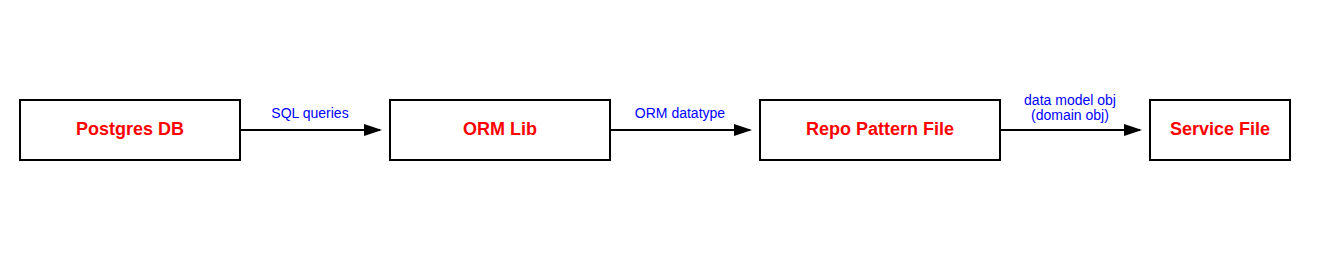
- The repository pattern moves all 3rd-party DB-library logic into a dedicated repository file; the service file only calls plain repository functions.
- The repository must return domain model objects — plain, library-agnostic types — instead of leaking a 3rd-party type like
objectionjs.Model. - Repository files are organized by main business entity (e.g.
users-repo.js,posts-repo.js), not by arbitrary grouping. - Transaction/connection objects must also be abstracted out of the service file — typically via a
UnitOfWorkclass — rather than passed around as rawtrx/dbClientobjects. - Avoid creating a brand-new repository operation per usecase; instead build a small set of reusable, parameterized operations and compose from them.
- The pattern is violated the moment a service file contains any 3rd-party-specific syntax —
select,where, a transaction object, a connection object, etc.